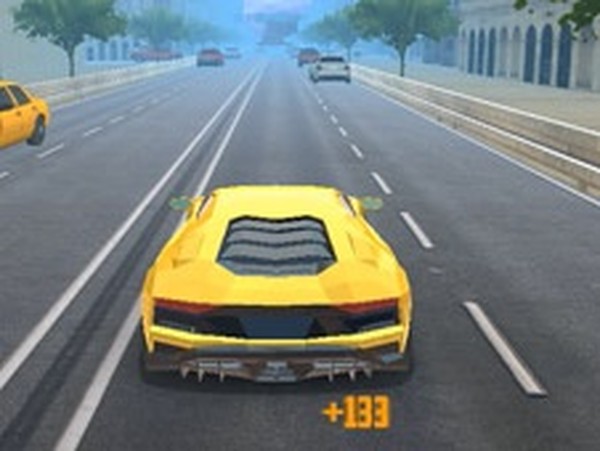
Urban Freeway Speed Runner delivers a focused driving experience that emphasizes precision over speed. The three game modes provide enough variety to keep sessions engaging, and the vehicle upgrade system gives a clear sense of progression. The snow and night environments add welcome visual and mechanical diversity. Controls are responsive on both desktop and mobile, though touch users may need a short adjustment period. The lack of violent content makes it a safe choice for younger players. A solid pick for anyone who enjoys traffic-based driving challenges.
Urban Freeway Speed Runner places you behind the wheel of a sleek sports vehicle on multi-lane highways filled with moving cars. The primary goal is to maintain speed while avoiding collisions with other vehicles. Each successful pass adds to your score, and the distance traveled determines your overall performance. The game rewards precise steering and quick decision-making, as traffic density increases the further you go.
As you accumulate points from successful runs, you gain access to a variety of sports vehicles. Each car offers different handling characteristics and top speeds. Performance upgrades allow you to improve engine output, braking responsiveness, and cornering stability. Visual customization options include new wheel designs, bumper styles, and lighting configurations, letting you personalize your ride.
The game includes several distinct driving environments. A sprawling cityscape with towering buildings provides one backdrop, while a snow-covered region introduces slippery road conditions. A nighttime urban setting changes visibility and traffic patterns. Each environment presents unique challenges, requiring adjustments to your driving approach.
Three distinct play modes keep the experience fresh. In the first mode, all traffic flows in the same direction, emphasizing speed and lane changes. The second mode introduces oncoming vehicles, demanding greater awareness and timing. The third mode tasks you with reaching checkpoints before a countdown expires, adding pressure to maintain consistent pace. Each mode tests different aspects of your driving ability.
On desktop computers, you can use keyboard keys for steering, acceleration, and braking. A nitro boost provides temporary speed increases for overtaking. Camera angles can be adjusted for better visibility. On mobile devices, on-screen touch controls handle all driving functions, making the game accessible on tablets and phones.
To maximize your distance and score, focus on smooth inputs rather than aggressive maneuvers. Learn the traffic flow patterns of each environment, as they vary between modes. Use the nitro boost on open stretches rather than in heavy traffic. Early upgrades to handling and brakes improve control significantly. Rotating between game modes helps you adapt to different scenarios and keeps your reflexes sharp.










Player Reviews
Sign in to comment
You must be logged in before posting a review or rating.
No account? Create one
No comments yet. Be the first to comment!